Showing posts with label flickr. Show all posts

Sunday, 26 February 2012

More than a Flickr of Interest

It's clear that spring is on the way now. The days are lengthening, and snowdrops are showing their  bright flowers in gardens and parks across Derby. The cool morning air is filled with the call of a multitude of birds, all  re-establishing their territories and preparing for the fast-approaching breeding season. On top of Derby's ancient cathedral the 2012 breeding season is also clearly underway. A number of you are helpfully clicking on the "comments" link to report times when interesting breeding behaviour is being seen. This forms a useful  guide to everyone else as to what is happening, but it also helps the Project Team look for and retrieve the best moments from the two video recorders installed inside the tower.

Local photographers and webcam watchers are also helping understand what's going on by uploading their photographs and screenshots to our dedicated Flickr site. We don't always highlight images posted there, but do take a regular peek at the latest images people from all around the world have seen and posted there. One local photographer is Ian (aka Superbrad) who regularly posts the most superb pictures to our site, like the one below.   We are looking up to the top of the tower on the side where our this webcam is positioned. It's here that we often see roosting, feeding and mating behaviour, and Ian has captured our falcon flying in, with the smaller male (tiercel) just visible on the stone grotesque in the extreme left side. IMG_6383

The video below shows just one of many moments when our two peregrines display to one another, and it's great to get a good side view of the falcon after the male flies off. We can clearly see how much larger and heavier she is than the tiercel. The date was 23 February.

The following day we captured this moment of nest-preparation. Look at how the nest scrape is created, with the bird lying low and pushing back with his legs. The fussing around with small stones is not actually part of the scrape-making process, and may simply be some sort of evolutionary hang-over from the full nest-building activity of most other birds, or perhaps nature's way of reinforcing the link to the nest site.


If you want to upload screenshots from the webcams yourself, or post photos you have taken outside Derby Cathedral, follow the link to our Flickr site on the top left side of this blog, and follow the instructions shown there in the introductory description. Alternatively, read this.


IMG_6351

Wednesday, 16 March 2011

Communicating with the Birds (and screen-printing help)

It's National Science Week this week, with the theme of communication. So Derby Museums gave  a special lunchtime lecture today, looking at how we have been reaching audiences with our use of new technology. Afterwards we went to Cathedral Green for a bit of peregrine-spotting. where we all counted ourselves immensely fortunate to be able to see our two birds mating briefly on top of the highest point of the tower.

A photographer from the Derby Telegraph came along, though from Craig's picture below it does looks more like we were interested in checking out his dandruff than looking for peregrines! Perhaps someone here can suggest a better caption than the one below. (If so, we'll replace it.)

Nick Moyes
Nick Moyes and Roger Shelley (centre) from Derby Museums with a
Derby Telegraph photographer on Cathedral Green.

_______________________________________________________________________________

Instructions on how make a screenprint & post it on Flickr

Whilst watching the webcams you notice something happening and you want to capture it and share it on Flickr. The process is simple and doesn’t take long so here’s how to do it:

The Print Screen button is at the top right of the keyboard.

So, with Internet Explorer open, view the web cams. Make sure the screen is un-obscured by either your mouse cursor or any other programme. Pressing the Print Screen button takes a snapshot of everything you are viewing on your monitor. Pressing the button doesn’t save it to a picture file. You have to do that manually.

So, you now have your image in the memory of the computer waiting for you to do something with it. The best programme for putting that picture in is Paint. This can be located under your Window’s Start Menu, Programs, Accessories. If you are using an up to date Windows operating system, e.g. XP, you may not initially see Paint there. You may need to press on the two downward facing arrows to expand what you see.

With Paint now open you can put your printed screen into it. Press the “Edit” option at the top of the screen and then press “Paste”.

Unfortunately you have the whole of your computer screen on your screenshot and that’s probably not what you want. So now you need to remove all the unnecessary information. Using the scroll bars on the side of the Paint programme to move them so that you can see clearly and wholly your new screenshot webcam. You will see at the side of Paint (this may be different for older versions of the programme) your editing options. At the top is a dotted square button, holding your mouse over that button it will select it if you press the button. This then allows you to select the area of your screenshot which you want to do something with.

From the top corner of your print screened web camera press and hold the left hand mouse button. Drag the mouse down to the bottom opposite corner of the camera and release the mouse button. With the box now around the area that you want go up to the “Edit” option and press “Cut”. The picture seems to vanish but, just like the screenshot, it’s been saved into the computer memory again waiting for you to do something with it. To do this press on the “File” button, then “New”. The computer will ask you a question of do you want to save your work... press “No”. You now have a completely empty Paint screen. Go back to “Edit” and press “Paste”.

You now have your picture of the web camera in a nice simple looking picture. Save it by pressing “File”, “Save” . It will ask you to give the work a title and a location of where to save it. Naming is simple, what the birds are doing – e.g. feeding, call it Feeding Peregrine1. As for location, I prefer to place it on the desktop, makes it easier to find.

Now open up Flickr and sign in to your normal account. You will see on the right hand side of the website is “Upload Photos & Videos”. Pressing that it takes you to another screen. In the centre is a gray box with steps, starting at step 1. Pressing ‘Choose Photo and Video’ will bring up a box asking you to locate the picture. You know where it is (on your desktop) and what it’s called( “Feeding Peregrine 1”). It gives you the option to add more if you want, otherwise press Upload Photos and Videos. It will then upload it to the site. This doesn’t mean it removes it from your computer, merely copies it. Next give it a description (title) and press Save.

To put that picture in the Derby Cathedral Peregrine picture pool simply go to it and you will see an ‘Add photo link’ above the pictures. Pressing that takes you to all the pictures you have taken, including the one you just saved. Press on that picture and press ‘Add To Group’. Job done.
Thanks to Craig for these helpful instructions which we have edited down a touch to save space. Let us know if you can't follow or understand anything - or if you can!

Wednesday, 16 June 2010

Lift Off!

Update 9.40pm Tuesday: the second chick to fledge flew around the cathedral several times this evening, landing on different buildings, ending up on a chimney above Irongate where it seemed to be settled for the night. Thanks to Cliff and Christine for keeping track of it (still not sure if it is male or female!). Monday's fledgling was up on a pinnacle near the tower top - clearly settled for the night there.

Derby's second peregrine falcon has fledged!
This photo shows the precise moment, captured and posted almost immediately by "Twwitcher" onto our Flickr photopool.

2nd Chick Takes to the Air - 16th June 2010 - 14.35

It seems it (she?) flew around 14:35 local time, though ironically we first heard the news via a phone call from Ruth in France to report her departure. So thanks to everyone who got in touch. As I write this (15:20) I've just recieved a text message from Nick B. to report that he has spotted the chick on the cathedral's nave roof, and that she seems OK. Whether or not she will be able to fly on from there remains to be seen.
Oops - a further call from Nick B. at 15:32 and she has flown on to one of the tall chimneys of the Silk Mill museum (the small one just left of centre on the photo), after not quite managing to make it to the tall, nearby Jury's Inn Hotel. But it does look like our second bird is a strong flyer and should be OK, too.

We gather that a photographer (Andy B) from Nottingham managed to capture the exact moment of take off, after waiting there most of the day with camera poised. He's agreed to send us some images and we'll try and bring this moment to you too. We'll retrieve a video clip of the fledging moment sometime tomorrow lunchtime if we can, and hope to post it just after lunch or later in the evening.

So what happens now?

It's still possible that one or both birds will come back to the nest ledge, and maybe confuse a few webcam watchers into thinking that they haven't left yet. But there's a much stronger chance that you'll see them at some point in the days ahead via the tower cam. This is a high vantage point on Derby Cathedral which the juveniles have used a lot in the past. So we'll switch the cams over in the next day or so to give better view looking across towards Jury's Inn Hotel. I'll also swap back the video recorders which have been running on both next cameras since yesterday so that the ledge is covered. (Apologies to those of you who wanting more video clips this season. It has been a very busy time for me both at home and at work recently, and it simply wasn't possible to find the free time to retrieve all the clips from inside Derby Cathedral Tower that you might have wished to have seen.)
(The photo shows the first fledger and the falcon both near the top of one of the pinnacles today. During the morning this bird successfully received food from the falcon in mid-air and took it first to the nave roof and then to the top of the Silk Mill, finally flying back to the tower top.)
Cathedral Green Antics
Despite the wonders of technology, nothing beats seeing peregrine falcons in real life. So this is where many of you reading this blog will now be earnestly wish you were living in or visiting Derby, because for the next few weeks there should be some amazing aerial antics to be seen from Derby's Cathedral Green. As the young peregrines gain in confidence their parents will be aiding the process of learning to hunt and fly, and all this can be watched from the ground. The Wildlife Trust-run Watchpoints will continue for some time yet, so if you haven't made it down to see them in the flesh (so-to-speak), do make a point of visiting in the days ahead. (Wednesdays, Fridays and Saturdays c.10.30am-1.00pm.).

Saturday, 12 June 2010

More recent photos as we await the first flight


Update Monday morning: we've spent three hours wandering round the local streets, peering from the tops of multi-storey car parks etc looking for the juvenile that fledged early this morning but so far without any success. The falcon (and the tiercel) have been flying over the whole area perhaps also searching for their youngster. Hopefully the bird is not on the ground but on a roof somewhere and will take off and return to the tower later. There are so many flat roofs, back yards, derelict plots, trees etc that finding the bird is like trying to find a needle in a haystack. Further update later today...

Update:Saturday's Watchpoint report has been added at the end....


Here are some recent photos via Flickr of the two juvenile peregrines, some taken from the ground by Colin Pass on Friday 11th June and some taken
via the webcams. Thanks to everyone for contributing them and especially Colin since he had to stand below the tower with his big, heavy lens and wait for the right moment!


There was not quite as much wing flapping on Saturday as we might have expected so opinions are now suggesting that fledging may yet be a couple of days off - even for the more advanced bird.

The forecast for the next few days is for good weather, perhaps with a few showers so that should not adversely affect the birds.
In a way, the longer they delay making their first flights, the stronger they will be and the less likely that they will come to ground...

The top four photos were taken by Colin. The two below were captured from the web cams by HelenSara and Craig. They show the chicks
waiting for food and then just about to get some!


Nice work everyone!

Nick Brown (DWT)


Here's the Report from the Watchpoint yesterday, Saturday 12 June

An early-ish start today! Chris and I were just starting to set things out at 10 o'clock this morning when a coach party from Chester on a sight seeing tour of Derbyshire ambushed us. We couldn't set telescopes up fast enough! So apart from seeing the Cathedral and Silk Mill museum as they had intended, they also got very good views of our chicks.

The falcon had already arrived at the cathedral at about 9.30 carrying a feral pigeon which she cached on a water spout and then sat back to enjoy the sunshine leaving the chicks calling to her and flapping to exercise their wings.

Just before 11.00 she suddenly took off over the river calling loudly and gaining height - a buzzard had drifted into her territory and was escorted off in the direction of the Bus Station.

This was followed by about twenty minutes of both adults flying together all around the area culminating in a breathtaking mock stoop by the falcon which took her low over Cathedral Green and around the corner of the Silk Mill before she soared away to land on the police radio mast near Chester Green.

Shortly after 12.00, we again saw both adults flying around to the North, sometimes landing for a while on Jury's Inn. The female then returned to her favoured perch just below the nest platform where she rested until, at about quarter to one, a crow flew across the Green and across the nave of the cathedral, just below the faclon - she launched herself at the crow and we later had reports from two ladies (who had travelled from Newcastle-under-Lyme just to see the peregrines) that an injured crow had been seen in Iron Gate trying to shelter in a shop doorway - presumably the same bird which won't be making the same mistake again!!!

Just as we were preparing to close the watchpoint (and this always seems to happen to us) the falcon took off again heading high over the Market Place area, we then saw why - the tiercel was coming in with a prey item. They flew around each other for a few minutes before making a food pass - the tiercel dropped his catch just as the falcon passed underneath him, she missed it at the first attempt but twisted around to catch it before it had fallen twenty feet. This was brought back to the Cathedral and plucked before being dropped into the nest platform, the falcon then returning to her perch.

The many visitors we had today (including a couple on holiday from Australia) were treated to excellent views of both chicks as well as the aerial displays put on by their parents.

Many thanks to all who came down today and thankyou for the generous contributions you made to our funds.

Andy, Chris and Helen.

Friday, 12 June 2009

Another sunny morning (updated)

Update (16:30) Male 008 has left the building -well, almost.
Latest reports are that our last bird to leave the nest was hanging on the the stonework just a short distance below the ledge. So not really a maiden flight yet. We're on standby in case a rescue is needed, but are hopeful that he'll be OK once he takes the plunge and lets go.
Subsequent update: Half an hour later one of our juveniles was back on the ledge. Is this the one that just left, and has managed to return, or is it one of the others? More information to follow later this evening.


Friday 12th has started sunny and calm in Derby.....though cloud is due to spread eastwards during the day.


Watchpoints have now been organised for today, Saturday and Sunday so do come down (or up) to Derby if you are in striking distance. There are a few DVDs on sale there but you can also order from the wildlife trust office by phoning 01773 881188 in office hours. The cathedral and museum shops may have copies for sale but did have some supply problems - please check.
Also remember that The Cathedral Centre on Irongate does excellent coffees, light meals and take-aways...well worth supporting!


Herewith some photos from flickr sent in by:


ann (Canada) - titled 'come on up',


by rejsharp (the threesome) and


by marski - showing one of the young on the roof of the cathedral.


Many thanks to them all!
Nick Brown (DWT)

Monday, 18 May 2009

Camera Problems

Derby Peregrines 154

For a short while we had our main camera stuck on night-time imaging today, but the problem with its iris control now seems to have been resolved. Whether this will cause a return to the alternating between day/night illumination that we had last year, only time will tell.

We've also been investigating the problems reported in early May whereby some users failed to get a refreshed image, whilst others had no problems. Both ends of the system (ie Streamdays and Derby City Council) doubt it has to do with them, or if it has to do with too many users watching at once. But the problem does seems to have ceased now that we're down to around 5,200 hits webcam per day from peaks around 7,000 at egg-laying time.

So, even if not grounded in hard evidence, could we suggest that you consider closing (or following a link away from) the webcam page when you've finished watching - especially as interest peaks again as the chicks approach fledging time?

It may also be timely for the Project Team to remind everyone that this blog's comments page is in danger of becoming more like a discussion forum, with lots of comments going back and forth unnecessarily. However, one particularly helpful comment has been left by Roger Sharp to aid people in uploading photos to our Flickr Group Pool. Follow this link to see images of how to do it. And just as with comments not relevant to the main purpose of this site, photos not relating to Derby Cathedral and its birds are liable to be be removed from the Flickr Pool.

______________________________________________

Here are some of our webcam images captured by viewers on May 19th and uploaded to our Flickr Group Pool.

by Fiona Arrowsmith
family meeting

by k_15H0r3
19 05 09

by Ann ( Canada )
A Tender Moment

Friday, 1 May 2009

And Then There Were Three - or Four?

With three peregrine chicks now hatched, we're wondering if we'll have the full clutch of four eggs hatched by the weekend, or whether this is it.


Untitled15

Our local media have been asking the same question, too. Yesterday I was asked to do two live interviews on local BBC Radio Derby and a phone interview with a reporter from our local newspaper. So it seems that interest in Derby's peregrines is still as strong as ever. The advantage of live interviews is that one gets a chance to give credit to all the parners in the project - Derbyshire Widllife Trust who do so much and Derby Cathedral who let us do it in the first place!

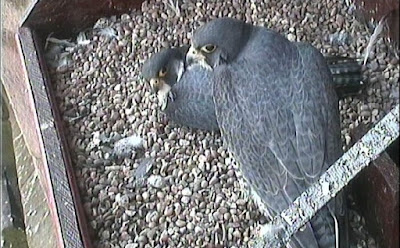
The new Flickr photo pool for webcam watchers to upload the moments they capture has already proved far more successful than I could have imagined. So many superb moments have been captured and placed there that its overwhelming. Jenniferwindridge captured the screen shot above at 19:45 and posted it to our Group Pool. At the tme of writing there now 55 pictures had been uploaded. Click on "more" to the lower right of the set of thumbnails to view more images in the pool.

Or turn on your favourite background music, sit back, and enjoy a melange of recently uploaded images using Flickr's Slideshow facility.

Below I have embedded a few of my favourites that you've uploaded so far, making the job of adding images to this blog so much easier and more efective than ever it was before!. Click each image if you want to view the picture on Flickr and see who uploaded them. I wonder how long it will be before we definitely answer the question posed by the last photo.


Three chicks hatched one to go


dont stand so close to me

keeping a close eye on the proceedings

Is this all four?

And finally, here's another chance to see our egg-nibbling stop-motion video which was created from a series of stills yesterday, shortly after the first egg had hatched.

Wednesday, 29 April 2009

Sharing Your Pictures - with Flickr

Midday changeover. Come on Dad, get out of my way!There is now a way you can save and share your peregrine pictures for everyone to see.

Today we are launching Derby Cathedral Peregrine Pictures - a Group Pool on Flickr - a popular photo-sharing website.


You can now save webcam pictures, or share images you've taken around Derby Cathedral of our birds. Once you've uploaded and put your pictures in our "pool" we can than copy or link to those pictures for use in this peregrine blog. But people can also just go there and see what magic moments others have captured from our webcams, or during their time visiting Derby Cathedral.

So as to keep a modicum of order we do ask you to read and agree to some basic group rules for posting pictures. (Photographers and authors do have copyright of their work, but anyone wanting to re-use an image posted here often need only contact the creator and request their permission. More often than not it wll be granted. )

For those not familiar with http://www.flickr.com/ here are some simple instructions for joining.

1) You will first need to set yourself up as a user by registering. (It's free, providing you don't want to upload more than 100Mb of pictures per month.)

2) You will then have to upload the picture/s you want to share to your own photostream (as they call it on Flickr. These are your photos on your pages - we can't see them yet in our Group Pool).

3) You can caption, label and even tag your own pictures so that they make sense to others. Please includes dates so that everyone will appreciate when they were taken.
4) Now you'll need to join our Group Pool (and of course confirm your agreement to follow the rules). Then you can add the pictures from your "photostream" to our Group for all to see in one place. The elusive little icon to "Add to Group" lies on the left side of a line of icons above your image.

Flickr does have its own help pages which gives more details on each step. Good luck!


The cameras froze agai this morning, but this changeover was captured shortly afterwards using an automated process described in this blog. So how do I save a Screenshot?
This has been asked and answered many times before, but with Windows the quickest way is simply to hit the PrintScreen button on your keyboard which saves the screen image into your Clipboard. Open any image editing package on your computer, then paste the contents of the clipboard into it. (e.g. Paint, IrfanView, Photoshop etc). You'll need to crop away the unwanted bit of image and then save as a .jpg file. (Avoid saving as .bmp or .png) This file is what you'll then upload to your account on Flickr, and after that you'll want to add it to our Group Pool.


How do I save LOTS of screenshots automatically?
Ah, this really is a magic trick! (A £1 donation to the project for everytime you use this, please!) You'll need an image editing package capable of automatically capturing screenshots. I swear by IrfanView, both for home and work use and it can be freely downloaded. It is an amazingly simple image editing package which can do batch edits to multiple images as well as scheduling automatic screen capture. (It was Froona who taught me the latter trick) The shortcut key to this function is just 'C' and you can then set the progam to save an image of your desktop or client area at a specified interval to any directory you choose. You can also set a limit to the size of file saved to disk - 80kb is reasonable), which is helpful if you leave it running for some time. Set your computer to show Thumbnails in this directory, and you have a quick way of skimming through hours of images captures very quickly to spot sudden changes in position, or some other activity you are looking for. Deleting unwanted files as you go helps make the management task easy.
Irfanview also does a great job of browsing through saved images and cropping and renaming the ones you want to keep. Left click the mouse to start drawing a rectangle over the area of image you want to crop, then Ctrl-Y crops away everything outside it. 'S' is a shortcut to save the file.


I don't want to use Flickr - how can I post a link that works reliably?
You might already use Photobucket, or other imaging-sharing websites, and want to post a link to your picture by leavng a "Comment" in our blog. Long website addresses often get split up in our limited comments page and then fails to work. So why not give a shorter link instead? To do this, highlight and copy your long url. Then go to http://www.is.gd/ and paste it into the box provided. Click "Compress That Address!" and you get a new url which you can then paste here far more reliably than before.


If you have problems with any of these instructions, please post a comment and I'll ammend the guidance accordingly.

Let's hope for some great egg-hatching moments shared for all to see over the next few weeks!